
T1 · Data Representation and Basic Operations
On this page
‼️:
-
Positive number (MSB=0): The left side is continuously supplemented
0. -
Negative number (MSB=1): The left side is continuously supplemented
1.
Conceptes bàsics basic concepts
-
Bit/dígit binari: Binary bit, the value is
0or1. -
Byte: usually 8 bits, which is the smallest addressable unit in common architectures.
-
Tipus de dades data type: Determines the interpretation method, size (mida) and format (format) of the data, which is affected by language, operating system and hardware.
-
The same set of bits can have different meanings:
01000111representable integers71, can also represent ASCII characters'G'.
Data type classification:
-
Escalars: Integer, real number, character, Boolean, enumeration, pointer.
-
Especials Special types:
void. -
Compostes/Agregades composite types: array, struct, union.
Notacions numèriques Base and conversion
-
Binari binary:
0–1. -
Octal:
0–7;The courseware is written in C, such as010Represents decimal8. -
Decimal decimal:
0–9. -
Hexadecimal:
0–9, A–F;The prefix is0x, such as0xA = 10. -
1 octal digit = 3 bits; 1 hexadecimal digit = 4 bits.
-
MSB — Most Significant Bit: Most significant bit.
-
LSB — Least Significant Bit: Least significant bit.
Conversion method
-
integer: decimal → binary:Continuous division by
2, remainder Read in reverse order. -
Decimal: Decimal → Binary: The decimal part is continuously multiplied by
2, take the integer part each time, sequential reading. -
binary → decimal: Multiply each by the corresponding weight and then sum; the weight on the right side of the decimal point is .
Example:
-
97₁₀ = 01100001₂, also an ASCII character'a'. -
53₁₀ = 00110101₂, also an ASCII character'5', character**'5'**not equal to numerical value**5**. -
0.3125₁₀ = 0.0101₂ = 1/4 + 1/16. -
11100110₂ = 0346₈ = 230₁₀ = 0xE6.
Enters integer
Signed / Unsigned Signed and unsigned
for N bits:
-
Sense signe / unsigned: Arrive .
-
Amb signe/signed (complement code): Arrive .
Common sizes used for courseware:
| Type | size | Signed range | Unsigned range |
|---|---|---|---|
char | 1 Byte | −128 ~ 127 | 0 ~ 255 |
short | 2 Bytes | −32,768 ~ 32,767 | 0 ~ 65,535 |
int | 4 Bytes | ~ | 0 ~ |
long long | 8 Bytes | ~ | 0 ~ |
-
Type sizes vary depending on the specific platform and cannot be considered identical for all systems.
-
**long**Pay special attention to: In the courseware example, 64-bit Windows is 4 Bytes and 64-bit Linux/macOS is 8 Bytes. -
A 64-bit system does not mean that all data types are 64 bits.
Representacions amb signe symbolic representation
-
Signe i magnitud original code: The sign bit is represented separately from the absolute value.
-
Complement a 1 one’s complement: A negative number is obtained by inverting the corresponding positive number bit by bit.
-
Complement a 2’s complement: Negative numbers are represented by corresponding positive numbers Negate and add 1 Get, commonly used in modern computers.
-
Biased representation Biased representation:Stored value = actual value + bias, often used for floating point exponents.
to 8-bit complement −23 For example:
+23       00010111
取反       11101000
加 1 11101001 → −23-
In the complement code, the weight of the MSB is , the remaining bits still have positive weights.
-
For example
11000111₂ = −128 + 64 + 4 + 2 + 1 = −57. -
Fixed N-bit operations discard extra carries, but still need to check if the result occurred overflow.
Endianness byte order
Endianness:Multi-byte data in memory byte sort order.
-
Big-endian Big-endian: The high-order byte is placed at the low address, and the network byte order adopts this method.
-
Little-endian little endian: The lower byte is placed at the lower address, x86 uses this method.
-
What has changed is byte order, not the bit order inside each byte.
Example: 1234₁₀ = 0x04D2, according to memory address from low to high:
Big-endian:     04 D2
Little-endian:  D2 04
Operations a nivell de bit Bit operations
Shift Shift
-
Shift left / shift left
**<<**: Everyone moves to the left and fills in on the right0. -
Shift right / move right
**>>**: Everyone, move to the right. -
For unsigned numbers, shifting 1 bit to the left is equivalent to multiplying without overflow.
2; Shifting right by 1 bit is equivalent to dividing2Then round down. -
Logical shift logical right shift: Left side supplement
0. -
Arithmetic shift Arithmetic shift right: Left complement sign bit.
Operations lògiques Logical operations
| A | B | AND with | OR or | XOR exclusive or |
|---|---|---|---|---|
| 0 | 0 | 0 | 0 | 0 |
| 0 | 1 | 0 | 1 | 1 |
| 1 | 0 | 0 | 1 | 1 |
| 1 | 1 | 1 | 1 | 0 |
-
AND:Both of them
1Only for1. -
OR: at least one is
1just for1. -
XOR: Two different numbers are
1. -
NOT: Negate bit by bit,
0 ↔ 1. -
In C/C++, the bitwise operators are
& | ^ ~;The logical operator is&& || !, don’t be confused.
Flags status flags
-
Zero:The result is
0. -
Negative / Sign: Reflects the sign bit of the result.
-
Carry: used to judge unsigned Whether the operation is out of range.
-
Overflow: used to judge signed Whether the operation is out of range.
to 8 bits For example:
11111111 + 00000001 = 1 00000000
unsigned:255 + 1 超出范围 → Carry = 1

01111111 + 00000001 = 10000000
signed:127 + 1 无法表示为正数 → Overflow = 1-
In two’s complement addition, Adding the same signs gives the result of different signs, indicating that overflow occurs.
-
It can also be judged: Carry into sign bit XOR Carry out of sign bit = Overflow.
Nombres reals real numbers
Punt fix / Fixed-point fixed-point number
The decimal point position is fixed, with Qm.n expressed. According to this courseware agreement:
-
1 bit: Sign bit. -
m bits: Integer part, excluding sign bit. -
n bits: Decimal part. -
total number of digits = .
-
actual value = two’s complement integer value ÷ .
-
step size / resolution = .
-
range = Arrive .
Example: 8-bit Q5.2
-
Total number of digits:
1 + 5 + 2 = 8. -
Step size:
0.25. -
Scope: −32 ~ 31.75.
-
01000111→71 / 4 = 17.75. -
11000111→−57 / 4 = −14.25.
same bit string 1110, the decimal point position is different, and the value is also different:
-
Q3.0:−2. -
Q1.2:−0.5. -
Q0.3:−0.25, the courseware abbreviation isQ3.
Coma floatant / Floating-point floating point number
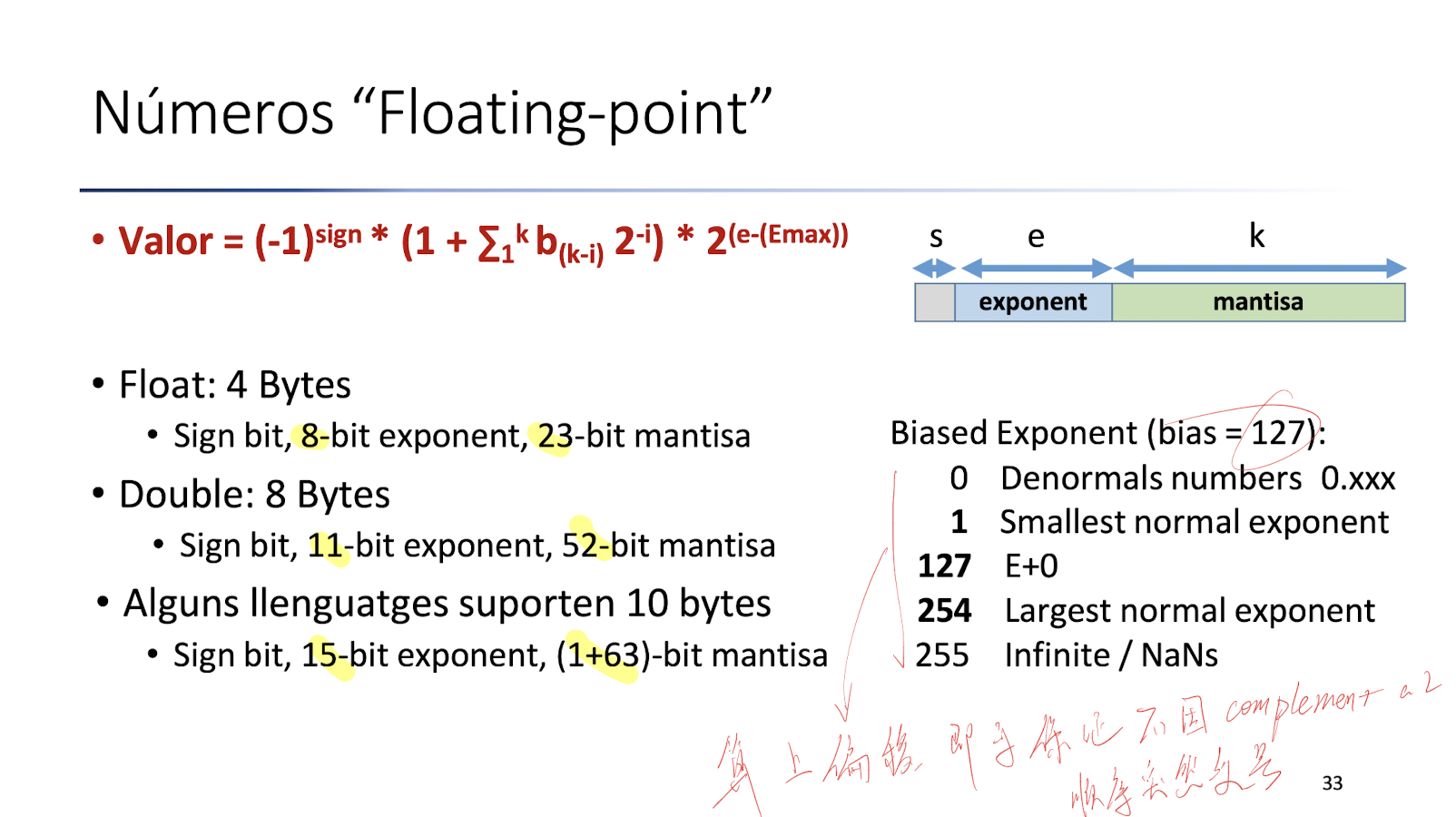
Representing numbers of different sizes by changing the exponent, a common format follows IEEE 754.
Composition: signe sign (only represents ±, not included in numerical calculations) + exponent exponent + mantissa mantissa.
| Format | total size | sign bit | Exponent bit | Number of decimal places stored | Bias |
|---|---|---|---|---|---|
float / FP32 | 4 Bytes | 1 | 8 | 23 | 127 |
double / FP64 | 8 Bytes | 1 | 11 | 52 | 1023 |
for normal normal number:
-
s: symbol,0is positive,1is negative. -
E:The actual stored index; True index = E − bias. -
f: The stored decimal part; the preceding1Yes implicit bit implicit bit. -
The exponent bit mainly affects the range (rang), and the mantissa bit mainly affects the precision (precisió).
-
Python built-in
floatUsually corresponds to 64-bit double precision.
Valors especials special values
Here’s f Refers to the actual stored decimal part:
| Exponential field E | f | meaning |
|---|---|---|
| All 0 | 0 | +0 or −0 |
| All 0 | Not 0 | Subnormal/denormal denormal numbers |
| Not all 0, not all 1 | arbitrary | Normal normal number |
| Full 1 | 0 | +∞ or −∞ |
| Full 1 | Not 0 | NaN — Not a Number |
-
Denormal numbers have no implicit leading
1, used to indicate very close to0number. -
Irregular number formula: .
Floating point encoding example
will 23.46875 Encoded as FP32:
23.46875₁₀ = 10111.01111₂
            = 1.011101111₂ × 2⁴

符号:0
指数:4 + 127 = 131 = 10000011₂
小数:011101111,再补 0 至 23 位

结果:0 | 10000011 | 01110111100000000000000
十六进制:0x41BBC000
Error of precision
-
express limited ability: Some decimal fractions loop infinitely in binary, such as
0.1, can only be stored approximately. -
Arrodoniment / rounding rounding: Replace with nearby representable value.
-
Truncament / truncation truncation: Directly discard the low digits or decimal part.
-
Overflow: The result exceeds the representable range of the format.
-
The result of an operation may require more bits than the original operands.
Floating point operations do not necessarily satisfy:
-
Associativitat associative law:
(a + b) + cmay not equala + (b + c). -
Distributivitat distributive law:
(a + b) * cmay not equala*c + b*c.
The order of operations, type conversions, and precision selection may change the final result.
Representacions per IA Representation in artificial intelligence
-
FP64, FP32, FP16, FP8: Floating point format with different digits.
-
BF16: 16-bit floating point format; different from FP16’s exponent and mantissa allocation.
-
INT8, INT4: Low-digit integer format.
-
TF32: NVIDIA specific computing format mentioned in the courseware.
-
Quantització / quantization quantification: Map values to fewer representation levels, reducing storage and computational overhead, but may introduce errors.
Tradeoffs when choosing a format:
-
Rang: Can express large and small numbers.
-
Precisió: Can distinguish fine numerical differences.
-
Memòria i rendiment: Memory usage and performance.
Example: 1750 亿参数 × 4 Bytes(FP32)≈ 700 GB, here only the storage of the parameter itself is calculated.
Characters and encodings
-
Char: Used to represent characters, numeric characters and symbols.
-
ASCII: 7-bit encoding, range
0–127, usually placed in 1 Byte. -
ISO-8859-1 / Latin-1: Single-byte encoding, which can represent 256 encoding positions.
-
Windows-1252 / CP1252: Common old-style Western European encoding, which interprets partial positions differently than Latin-1.
-
Unicode: Unified definition of characters and their code points; UTF is a specific encoding method.
Common UTF encodings:
-
UTF-8: used for each Unicode code point
1–4 Bytes, ASCII compatible. -
UTF-16: Used per code point
2 或 4 Bytes. -
UTF-32: Used per code point
4 Bytes.
Note:
-
The number of bytes is not equal to the number of characters.
-
The encoding and decoding methods are inconsistent and garbled characters may appear.
-
Multibyte text cannot be arbitrarily truncated or indexed by byte.
-
String string with single character character Different; C strings end with
'\0'end.
Enumeration, Boolean and void
-
Enumeration / enum enumeration: Use symbolic names to represent a set of values, such as
red, green, blue, the bottom layer is usually expressed as an integer. -
Boolean Boolean value:
true / false;Only 1 bit of information, but actual storage size depends on language and implementation. -
C condition is being judged:
0false, not0is true. -
void: Indicates no value; the function return type isvoidWhen , no value is returned. -
f(void): Explicitly indicates that the function does not receive parameters. -
void*: Universal object pointer, the specific type of the pointed object is not specified; andvoidDifferent.
Punters / Pointers
Pointer: Stores the value of the memory address (adreça de memòria).
int num = 0x0503;
int *p = #-
num: The value in the variable, that is0x0503 = 1283. -
&num:Variablenumaddress. -
p: The address saved by the pointer, which is equal to&num. -
&p: The address of the pointer variable itself. -
*p: Read the value of the pointed position, which is equal tonum, called dereference dereference.
Aritmètica de punters pointer arithmetic
-
**p + 1**Advance one element of the pointed type, not a fixed advance of 1 Byte. -
char*: Normally forward1 Byte. -
int*:IfintIf it is 4 Bytes, then move forward4 Bytes. -
General rules:
p + kThe address offset is**k × sizeof(*p)**. -
Pointer arithmetic should be used within a valid array range.
Tipus de dades agregades compound types
Arrays and tensors
-
Array: A set of elements accessed by index (íindex).
-
In C/C++ arrays, the elements are of the same type and stored continuously.
-
Example:
int a[5];ifintis 4 Bytes, the array occupies a total of20 Bytes. -
Can have one or more dimensions; tensor It is a generalization of multi-dimensional arrays and is often used in machine learning.
Multidimensional arrays still need to be arranged into a sequence in memory:
矩阵:
A B C
D E F

Per fila / row-major:
A B C D E F

Per columna / column-major:
A D B E C F-
C/C++: Store by row.
-
Fortran, MATLAB, R: Usually stored in columns.
Structs
-
Combine multiple fields together, each field can be of different types.
-
Each field has its own storage space and can retain values at the same time..
-
Padding padding bytes: used for memory alignment, so the total size is not necessarily equal to the sum of the field sizes.
Courseware example:
int 4 B + char 1 B + padding 3 B + float 4 B = 12 BUnions
-
multiple members share the same memory.
-
Writing to a member overwrites the shared storage contents.
-
Size needs to accommodate the largest member and meet alignment requirements.
-
in the courseware
int / char / floatunion is4 Bytes.
Struct: members occupy space respectively; union: members share space.
Classes and objects
-
OOP — Object-Oriented Programming: Object-oriented programming.
-
Class class: Combine data fields with methods for manipulating that data, and control access.
-
Object: Instance of class (instància).
-
For example
stringIn addition to saving characters, the class also provides related operations;char arrayItself is just a character array.
[!note] Courseware errata
PDF p17:
11100110₂ = 230₁₀, no118.PDF p29: two’s complement
Q5.2The range is −32 ~ 31.75.PDF p30: Decimal decimal Convert to binary for use Multiply by 2 and round.
Machine-assisted translation · Read Chinese original