
Lab 01 02
On this page
Linux Environment
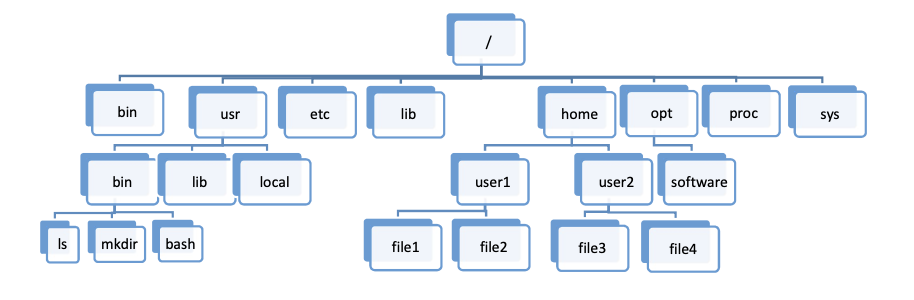
bin: system commands.usr: additional operating-system directories and software.etc: configuration files.lib: supporting libraries.home: each user’s home directory, where personal files are stored, such as/home/uubuntu.opt: installed applications.proc: operating-system and process information.sys: more detailed system information.
Using cd
cd .stays in the current directory.cd ..returns to the parent directory.- An absolute path starts at the root directory
/, for example/usr/lib/x86_64-linux-gnu/libc.so. - A relative path starts at the current directory. From
/home/ubuntu, an example is../../usr/lib/x86_64-linux-gnu/libc.so.
Working with a Command Interpreter (Shell)
Common shells include Bash and ycsh. Entering bash switches to Bash.
Commands can be external (externs), installed in the system, or built in (interns), implemented by the shell itself. For example, cd must be built in because the shell needs to change its own working directory.
Getting Help
man: documentation for command interpreters, external commands, and installed applications that provide man-format help.info: GNU’s help system for commands and applications with info-format manuals.help: Bash’s built-in help command for its built-in commands.
man displays help files in a standard format. Common navigation keys are:
- Space: move forward one screen.
- b (back): return one screen.
- d (down) / u (up): move down or up half a screen.
- Enter / j: move down one line; k moves up one line.
- /: search. Enter the search text and press Enter. For example,
/SEE ALSOfinds the first occurrence of “SEE ALSO,” usually the section containing references to related commands. - n (next): jump to the next match.
- q (quit): exit the manual page.
Basic Text Editing
Use nano followed by a filename to edit a file. To view a file without opening an editor:
cat document.txt   # Print the whole file without pagination.
less document.txt  # Browse it with controls similar to a manual page.
more document.txt  # Another paginated viewer.
A pipeline connects commands:
cat document.txt | sort | lessHere, cat reads document.txt, sort arranges its lines alphabetically, and less displays the result.
Use aliases to give commands another name:
alias rmi='rm -i'
alias cp='cp -i'
Files and Permissions
ls -l displays permissions for files and directories.
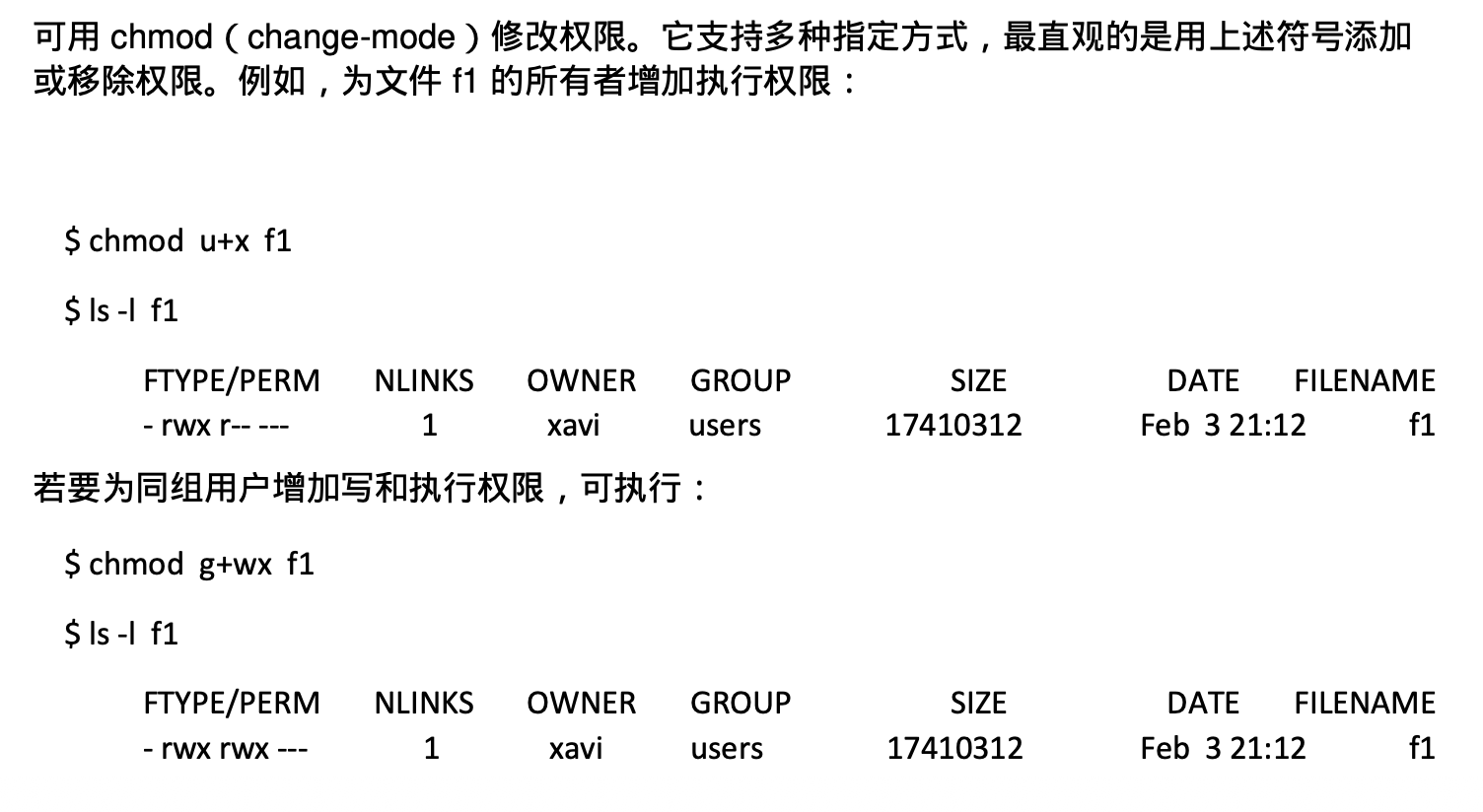
The user categories are owner (u), group (g), and others (o). The permission flags are read (r), write (w), and execute (x).

FTYPE/PERM: The First Character
-: a regular file, including text files, executable files, and data files.d: a directory.p: a named pipe for passing data between processes.s: a named socket for interprocess communication.c: a character device, such as/dev/null.b: a block device, usually a disk or partition, such as/dev/sda1.
The Remaining Characters: Three Groups of r/w/x
The three groups describe the permissions of the owner (rw-), group (r--), and others (---), in that order. In this example, the owner can read and write but cannot execute the file.
Changing Permissions with chmod
Special Shell Characters
*: a wildcard matching any sequence of characters. For example,ls d*lists names beginning withd.?: matches any single character.>: redirects output. For example,ls > output_lssaves the output oflsinoutput_ls.>>: appends output to the end of a file without truncating its existing contents.|: a pipe; sends the output of the command on the left to the command on the right.<: redirects input; reads from the specified file.2>: redirects a command’s error output to the specified file. By default, standard output and standard error both go to the terminal.>&: redirects standard output and standard error together.
For example:
cat < document.txt | grep "sortida" >output.txt 2>error.txtcat reads document.txt through standard input and sends its output through the pipe to grep. grep writes matching lines to output.txt through standard output (1), and error messages to error.txt through standard error (2).
Standard Input and Output Channels
| Channel | Name | File descriptor | Purpose | Default connection |
|---|---|---|---|---|
| 0 | stdin | 0 | The program reads data | Terminal keyboard |
| 1 | stdout | 1 | The program writes normal results | Terminal screen |
| 2 | stderr | 2 | The program writes error messages | Terminal screen |
Filtering and Searching
grep searches text files for character sequences:
nano document.txt
grep "hello" document.txt
In grep, ^ represents the beginning of a line. For example, grep "^d" finds all lines beginning with d.
File Systems
mount lists the file systems in the environment and their mount points.
/procprovides process information, for exampleproc on /proc type proc./sysprovides system information, for examplesysfs on /sys type sysfs./is the root of the entire file system; an example device is/dev/sda1with typeext3.
Common file systems include NTFS on Windows, APFS on macOS, and ext4 on Linux.
Environment Variables
env displays the variables defined in the current shell environment. Prefix a variable name with $ to read its value.
echo prints output to the terminal:
echo $USER
# easonlin
echo USER
# USER
export defines or changes a variable:
export variable_name=valueThere must be no spaces on either side of =.
English translation · Read Chinese original